Why it matters
In healthcare, an expired product does not go back on the shelf. It becomes disposal, a loss provision and sometimes a stockout of the same item in another location that would have sold it all in time.
Looking only at the expiry date is not enough. A batch that expires in 60 days can be safe if turnover is high, and a batch that expires in 200 days can be lost if another batch of the same product is ahead in the queue.
How it works
- A queue by expiry. For each product and location, batches queue up by expiry date. That is FEFO: first expired, first out.
- Consumption works through the queue. Daily consumption empties one batch at a time. The next batch only starts being used when the previous one runs out or expires.
- What is left becomes a loss. The quantity not used by the expiry date is the leftover. Leftover times unit cost is the projected loss in reais.
- One action per batch. Simple rules suggest what to do, and the planner can change the action and track progress.
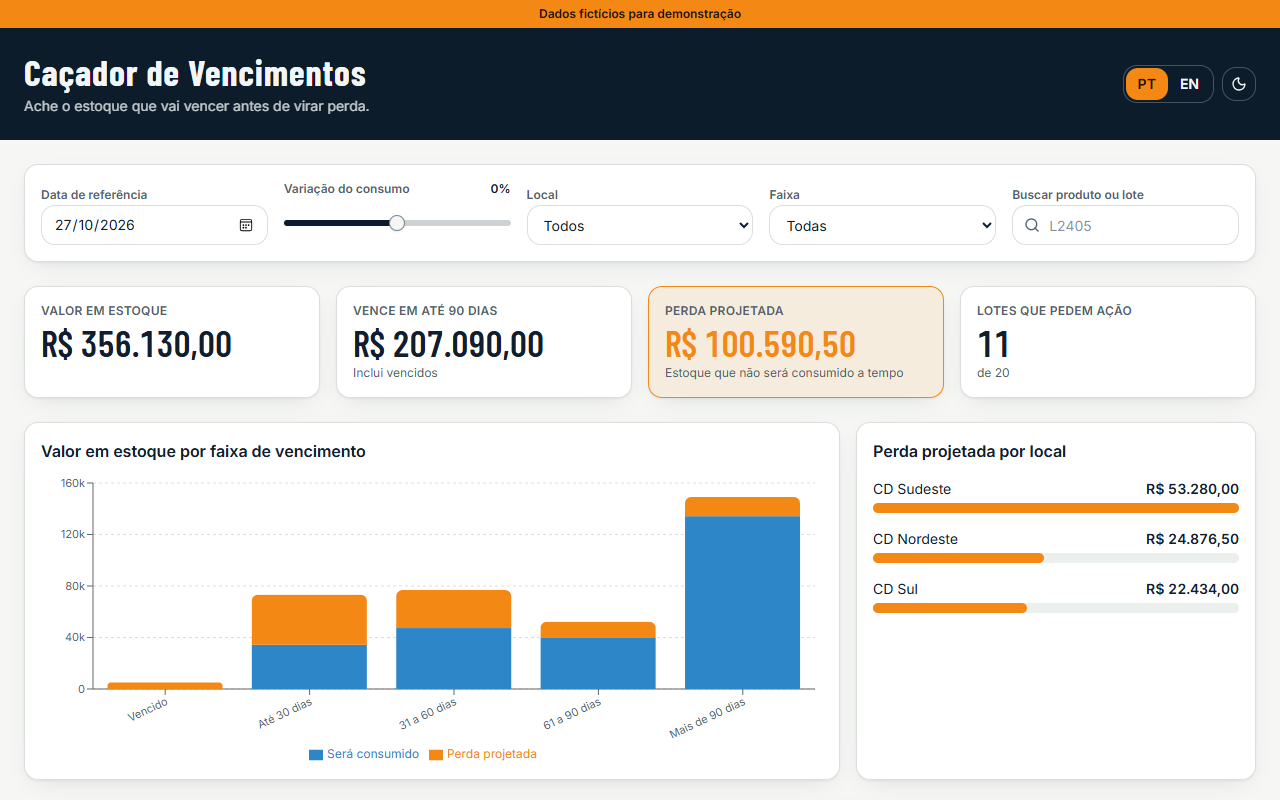
On screen you can change the reference date, simulate a consumption change from -50% to +50%, filter by location and import your own CSV. Everything runs in the browser.
Suggested action rules
Tested in this order. The first one that applies is suggested.
| Batch situation | Suggested action |
|---|---|
| Already expired | Block and dispose |
| Consumption covers the whole batch | Monitor |
| Another location uses at least 20% of the leftover in time | Transfer to that location |
| Expires within 30 days | Provision the loss and plan disposal |
| Expires within 90 days | Commercial action: discount or campaign |
| Expires in more than 90 days | Review the product's purchasing plan |
Example with the demo data
Four batches from the fictional dataset, with no change in consumption.
| Batch | Expires in | Quantity | Consumption | Leftover | Projected loss | Action |
|---|---|---|---|---|---|---|
| L2405 · Painkiller · Southeast DC | 25 days | 4,000 units | 60 units/day | 2,500 units | R$ 21,250.00 | Transfer 1,050 units to South DC |
| L1120 · Vitamin C · Southeast DC | 45 days | 2,500 units | 30 units/day | 1,150 units | R$ 21,160.00 | Commercial action |
| L6612 · Children's syrup · Northeast DC | 95 days | 1,800 units | 15 units/day | 555 units | R$ 11,821.50 | Review purchasing plan |
| L1128 · Vitamin C · Southeast DC | 160 days | 3,000 units | 30 units/day | 0 | R$ 0.00 | Monitor |
L6612 expires in 95 days, but batch L6604 of the same syrup is ahead in the queue. That is why it only starts being used on day 12 and 555 units are left over. Looking only at expiry, this batch would seem safe.
How I built it
I wrote the specification with Claude: the sample data, the FEFO formula, the action rules and the numbers the screen had to show. Claude sent that specification to Lovable through the official connector, and Lovable generated the app in React. Then I checked the on-screen totals against the calculation done by hand.
- Stock value: R$ 356,130.00
- Projected loss: R$ 100,590.50
- Batches that need action: 11 of 20
What I learned
- Check numbers are worth more than a long prompt. With the expected totals in the specification, I could tell right away whether the app's math was right.
- FEFO changes the math. Calculating each batch on its own underestimates the loss, because it ignores that the next batch waits for the previous one to run out.
- A transfer only pays off if the other location uses it in time. That is why the rule requires the destination to absorb at least 20% of the leftover before expiry.
About the data: products, batches, costs and locations are fictional. The rules were simplified for the demo; in a real case, transfers and disposal follow health regulations. An imported CSV is processed in the browser and never leaves your computer.